
How to give someone who is not an admin user access to a contact group, and what each level of access lets them do, as an Admin User.
Until now, managing a contact group meant being an admin user and seeing everything.
You can now give any existing user access to a specific contact group(s), at one of three levels, without making them an admin.
Non admin Access Levels (For contact group management)
-
Owner, Editor and VIewer
| Can they… | Viewer | Editor | Owner |
|---|---|---|---|
| See the group and its contacts | Yes | Yes | Yes |
| See escalation path's and schedule's for the group | Yes | Yes | Yes |
| Export the contact list | Yes | Yes | Yes |
| Add and remove members | No | Yes | Yes |
| Change escalation levels | No | Yes | Yes |
| Create and change schedules | No | Yes | Yes |
| Rename the group | No | Yes | Yes |
| Give other people access | No | Viewer and editor only | Any level |
| Delete the group | No | No | Yes |
Anything a viewer can do, an editor can do, and anything an editor can do, an owner can do.
Admins sit outside all of this. An admin can do everything on every group without being given a specific role, and appears in the list as Owner (Admin).
How to give someone access
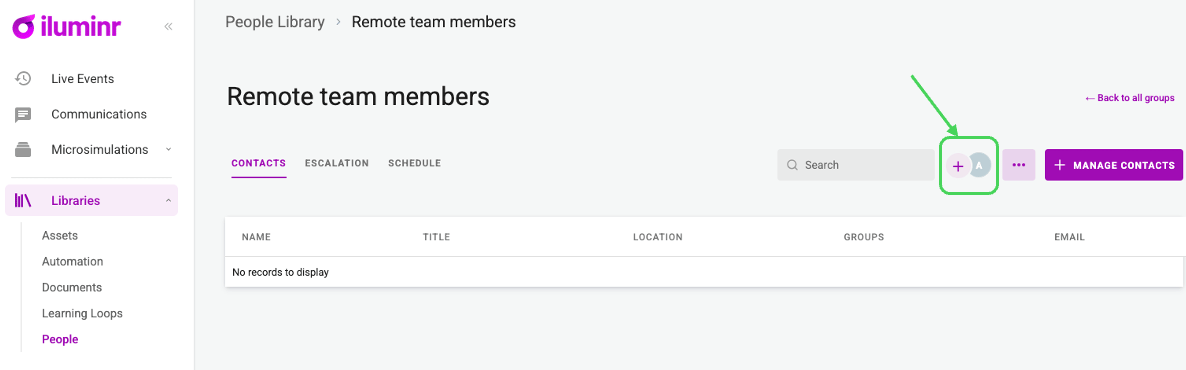
- Open People Library and select the group you wish to grant access too.
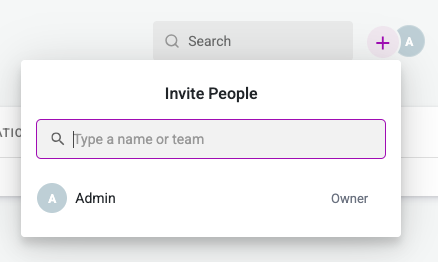
- Open the invite control and search for the person. *They need an active iluminr account.
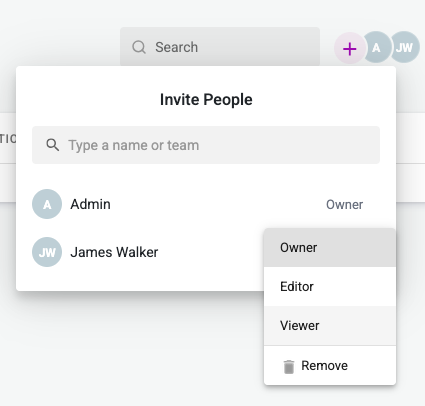
- Pick viewer, editor or owner.
That is the whole flow. Access starts working immediately. There is no invitation to accept and no specific notification.
A few rules worth knowing
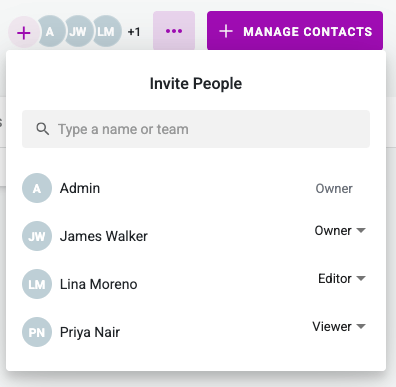
A person holds one role per group. Give them a new one and it replaces the old one rather than adding to it. The same person can be an editor on one group and a viewer on another, and that is a perfectly normal setup.
Editors can hand out access, but only viewer and editor. They cannot make anyone an owner, including themselves.
Every group keeps at least one owner. If you are the last owner, you can pass ownership to someone else, but you cannot simply remove yourself and leave the group ownerless.
Revoking access takes effect on the person's next action in iluminr, no need to log out and back in.
What it looks like for them
Someone with group access sees a narrower People Library. Only the groups they hold a role on appear. Everything else is hidden, not greyed out.
What they see when they open a person depends on their level:
- Owners and editors see the full contact record.
- Viewers see the person in the context of this group only: their place in the group, the group's schedule, the group's escalation path. Nothing about the person's other groups, teams or roles.
What stays restricted to admins
Three things do not delegate.
-
Creating a group. Only an admin can. Whoever creates it becomes its owner, and can then hand out access from there.
-
Creating a new contact. Adding a person to the system is an organisation-wide act, and it counts against your contact entitlement, so it stays with admins. Owners and editors can add people who are already in iluminr through Manage members, and search the full contact list to find them. They cannot import a contact file and they cannot key in someone new.
-
Editing a person's own details. Job titles, phone numbers, email addresses. An editor manages the group, not the people in it.
What this does not cover
This delegated access level only applies to Groups in the People Library and nothing else. It does not grant anyone access to communications, playbooks, event rooms, or anywhere else a contact group happens to be referenced or used, it is only for managing the groups.
It also does not replace Role Sets. Role sets control what someone can reach across the platform. Group access controls which contact groups they can work with once they are in the People Library only. You will usually need both.
Teams can only be managed by an admin user.
FAQ
Does this cost an extra licence?
-
No. You are giving access to people who already have an iluminr account (i.e. they already have a licence). Adding brand-new contacts still counts against your contact entitlement, which is why only admins can do it.
Can an editor promote themselves to owner?
-
No. Editors can grant viewer and editor. Owner is out of reach.
Can I give someone access to every group at once?
-
No. Access is granted one group at a time. Someone who genuinely needs all of them is and can be made an admin.
What happens when someone leaves?
-
Their access is removed with them.
-
Deleting a group removes everyone's access to it as well.
Related articles
- What a contact group is → 4. People Management - Contact Groups
- Platform-wide permissions → Get to know Role Sets - Access Levels
- Escalation paths → Managing escalation pathways
Need more assistance? Submit a support ticket