
A Microsimulation is a short, scenario-based exercise that allows people to practise how they would respond to a real situation in a safe environment.
Microsimulations help organisations run frequent and realistic readiness exercises across scenarios such as cyber incidents, outages, and crisis events. Learners work through decisions one step at a time, creating opportunities to build confidence, identify gaps, and measure readiness.
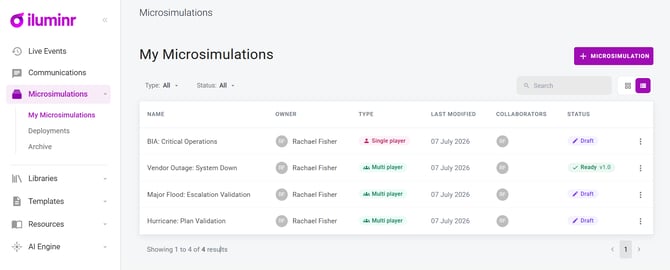
Which type of Microsimulation should I choose?
| Single Player | Multiplayer | |
| How it runs | A learner completes a scenario independently at their own pace. | A facilitator runs a live session with a team. |
| Best for | Reaching many learners at scale. | Team coordination, discussion, and decision-making under pressure. |
| Scheduling | An open window with reminders . | A scheduled session with a facilitator . |
| Duration | Typically 5 - 15 minutes | Usually run in a 30/60/90 min slot. |
Both types of Microsimulations use the same create, deploy, and review cycle, allowing organisations to build consistent readiness practices across different audiences and delivery methods.
What is the Microsimulation Lifecycle?
Every Microsimulation follows the same end-to-end cycle: Create → Deploy → Review. This cycle applies to both Single Player and Multiplayer Microsimulations, providing a consistent way to build, deliver, and measure readiness exercises.
1. Create your content
Build and manage scenarios as templates in the Microsimulation library. The single-player and multiplayer builders share the same framework, so they work the same way. Ground scenarios in your own material through the Document Library and the AI Context Engine, so feedback and reports speak in your organisation's terms — your policies, frameworks, and standards.
2. Deploy and facilitate delivery
Launch from Deployments — one place for both types of Microsimulations. Content and deployment are separate, so one template can be deployed many times, to different audiences and on different dates. Single player runs on an open window with reminders; multiplayer runs as a scheduled, facilitated session from the Facilitator Console.
3. Review organisational intelligence
Every Microsimulation reports through the same insights (Overview, Intelligence, Activity), turning responses into capability signals — Readiness, Confidence, Alignment, and Blind Spots — so you can see where your people are ready and where the gaps are. Readiness stops being a gut feel and becomes something you can show.
Insights from one round shape the next scenario you build — so capability compounds, and practice becomes proof.
Why Microsimulations?
Microsimulations provide a consistent approach to building organisational readiness through frequent practice, realistic scenarios, and measurable outcomes.
Insights from each exercise help shape future scenarios, allowing organisations to continuously improve capability over time.
Frequent, realistic practice, measured consistently, is what builds genuine readiness.
Related Articles:
- Get to know the Single Player Microsimulation Builder
- Get to know Deployments for Microsimulations
- Multiplayer Microsimulations are changing — what's coming, and what to do
Need more assistance? Submit a support ticket