---
title: Get to know Playbook Tasks views
description: "Unlocking the Power of My Playbook Tasks view.\nEverything you need to know about the My Playbook Tasks view in the Event Room"
---
[Skip to content](https://help.iluminr.io/knowledge/unlocking-the-power-of-my-playbook-tasks-view#main-content)
English
Show submenu for translations

Open main navigation
Close main navigation
- English
Show submenu for translations
- [Log in to iluminr](https://login.catalysttech.co/)
[Log in to iluminr](https://login.catalysttech.co/)
iluminr Knowledge Base
- There are no suggestions because the search field is empty.
1. [Knowledge base](https://help.iluminr.io/knowledge?hsLang=en)
2. [iluminr for Response and Communications](https://help.iluminr.io/knowledge/iluminr-for-response-and-communications?hsLang=en)
3. [Critical Event Management](https://help.iluminr.io/knowledge/iluminr-for-response-and-communications?hsLang=en#critical-event-management)
# Get to know Playbook Tasks views
## Unlocking the Power of My Playbook Tasks view. Everything you need to know about the My Playbook Tasks view in the Event Room
If you've ever wondered how to maximise the potential of Playbooks Tasks view, you're in the right place. In this guide, we'll walk you through its key features, from task management to collaboration, so you can leverage it effectively.
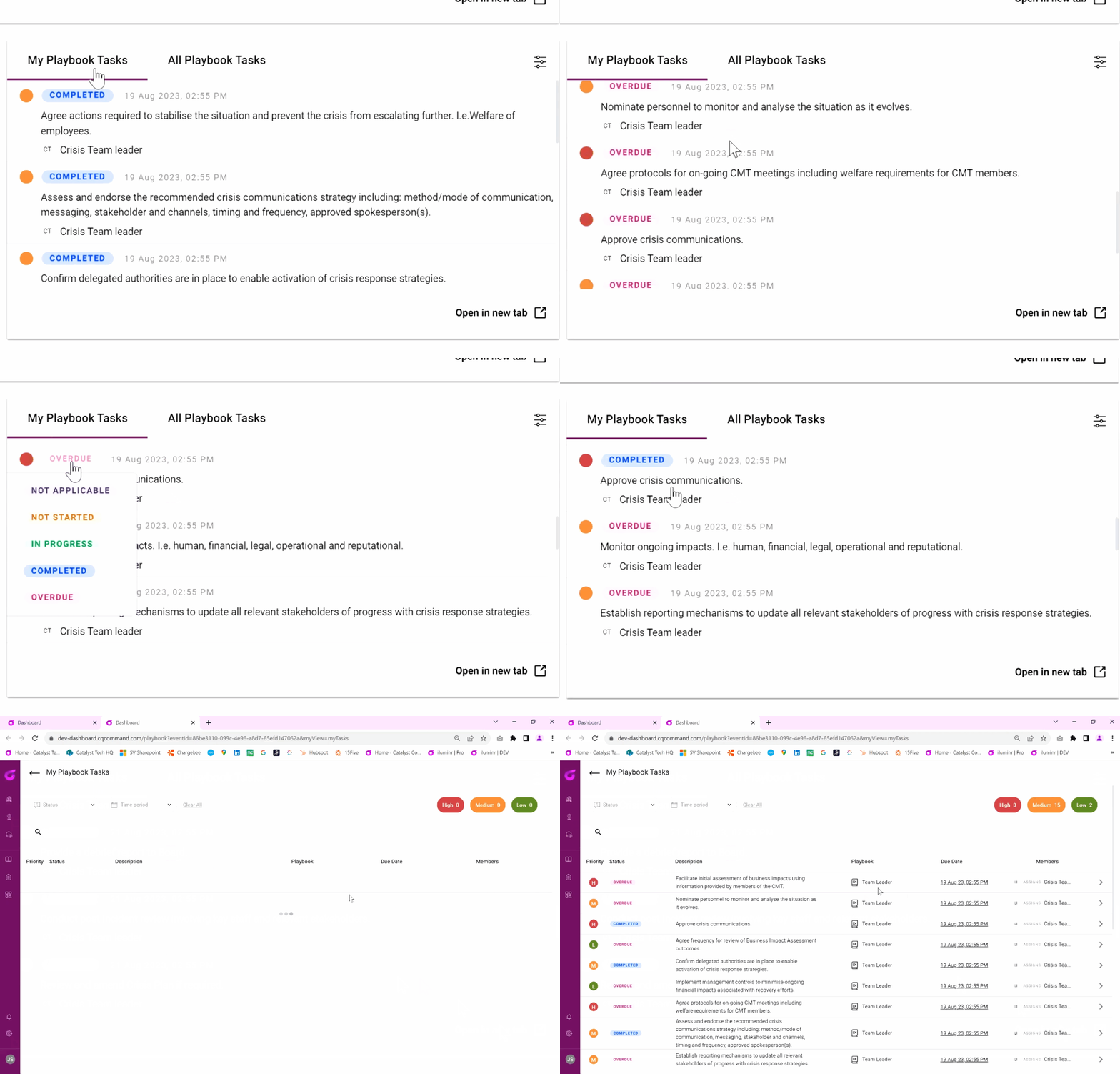
**My Playbook Tasks** isn't just another feature; it's your personalised dashboard designed to enhance productivity. It compiles all **Playbook tasks assigned to you, a *role* you hold or a team you are on** across every playbook activated for the Event, allowing you to focus solely on what matters most.
**Example:** Imagine you're leading the Crisis Team in an event with six different playbooks. No need to shuffle between them—**My Playbook Tasks aggregates all your responsibilities into a single, centralised overview.**
[](https://downloads.intercomcdn.com/i/o/822007491/d66ca9d8a1e945c3aad92e21/Playbooks+-+My+Tasks.gif)
#### Use Full-Screen View for Greater Detail
Need to dig deeper into each task? The full-screen view has got you covered. To access this, simply click '**open in new tab.**' This expanded view not only shows more detailed information about each task but also specifies which playbook it originates from.
#### Collaboration Unleashed with **All Playbook Tasks** view
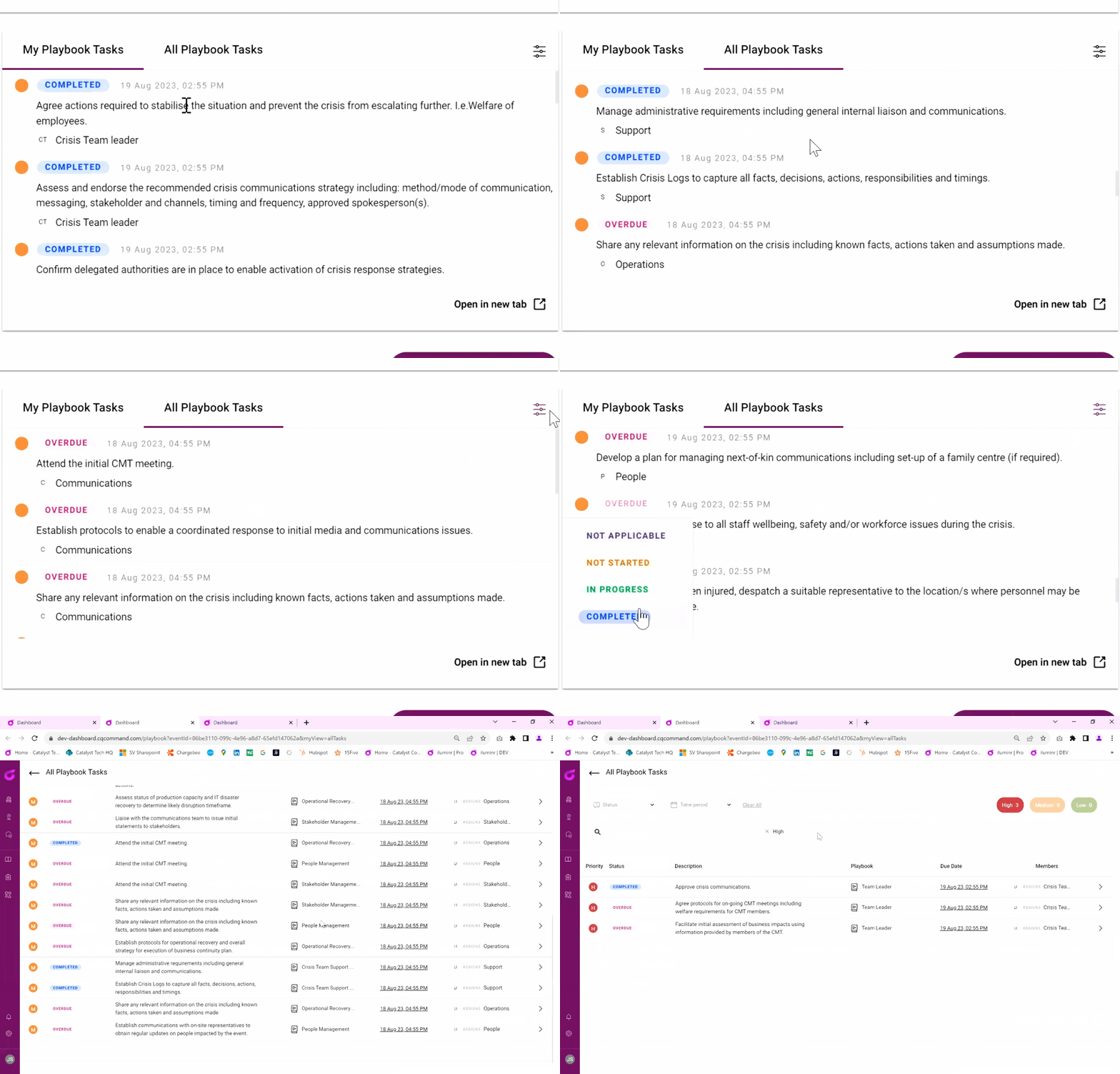
While [My Playbook Tasks](https://help.iluminr.io/knowledge/unlocking-the-power-of-my-playbook-tasks-view#h_711a2c6095) focuses on individual users, the **All Playbook Tasks** tab is engineered for team collaboration. Here's how it helps:
- Provides an aggregated view of tasks from all playbooks activated for the Event.
- Ensures seamless collaboration by keeping everyone in the loop.
Provides an aggregated view of tasks from all playbooks activated for the Event.
Ensures seamless collaboration by keeping everyone in the loop.
[](https://downloads.intercomcdn.com/i/o/822032001/157786182d1ac8f94c26d170/Playbooks+-+All+Tasks.gif)
#### Efficient Task Management: How to Filter by Status and Priority
One unique feature of the All Playbook Tasks view is its powerful filtering capabilities. You can sort tasks by their status (completed, in-progress, etc.) and priority levels (high, medium, low).
**💡 Tip:** In a time crunch and need to see overdue tasks? Use the filtering feature to get the list you need in seconds.
#### Dive Deeper with Enhanced Viewing Options
The full-screen view not only provides a comprehensive look at each task but also identifies which playbook it belongs to. It's like having your entire task list, annotated and organised.
#### Navigating with Ease: The New Stacked Playbooks Layout
Navigating through multiple active playbooks is now a breeze, thanks to the newly redesigned carousel scroll. Playbooks now stack atop each other, offering a smoother and more intuitive experience.
---
### Related Articles:
- [How do I Activate and Use a Playbook?](https://5853449.hs-sites.com/knowledge/unlocking-the-power-of-my-playbook-tasks-view?hsLang=en)
- [Get to know Playbook Templates](https://5853449.hs-sites.com/knowledge/what-are-playbook-templates?hsLang=en)
- [Does updating a Playbook Template impact an Active Playbook in an Event Room?](https://5853449.hs-sites.com/knowledge/does-updating-a-playbook-template-impact-an-active-playbook-in-an-event-room-iluminr-help-center?hsLang=en)
**Need more assistance?** [Submit a support ticket](https://iluminr.io/resource-centre/support-ticket/?hsLang=en)
- [iluminr for Response and Communications](https://help.iluminr.io/knowledge/iluminr-for-response-and-communications?hsLang=en#main-content)
- [Get Started with Using iluminr](https://help.iluminr.io/knowledge/iluminr-for-response-and-communications?hsLang=en#get-started-with-using-iluminr)
- [Communications](https://help.iluminr.io/knowledge/iluminr-for-response-and-communications?hsLang=en#communications)
- [Critical Event Management](https://help.iluminr.io/knowledge/iluminr-for-response-and-communications?hsLang=en#critical-event-management)
- [Training Options](https://help.iluminr.io/knowledge/iluminr-for-response-and-communications?hsLang=en#training-options)
- [iluminr for Admin Users](https://help.iluminr.io/knowledge/iluminr-for-admin-users?hsLang=en#main-content)
- [Get started with managing iluminr](https://help.iluminr.io/knowledge/iluminr-for-admin-users?hsLang=en#get-started-with-managing-iluminr)
- [Integrations](https://help.iluminr.io/knowledge/iluminr-for-admin-users?hsLang=en#integrations)
- [People and Permission Management](https://help.iluminr.io/knowledge/iluminr-for-admin-users?hsLang=en#people-and-permission-management)
- [Event Room Management](https://help.iluminr.io/knowledge/iluminr-for-admin-users?hsLang=en#event-room-management)
- [Alert Automations](https://help.iluminr.io/knowledge/iluminr-for-admin-users?hsLang=en#alert-automations)
- [Troubleshooting](https://help.iluminr.io/knowledge/troubleshooting?hsLang=en)
- [Manage Microsimulations](https://help.iluminr.io/knowledge/manage-microsimulations?hsLang=en#main-content)
- [START HERE](https://help.iluminr.io/knowledge/manage-microsimulations?hsLang=en#start-here)
- [Multiplayer Content Management](https://help.iluminr.io/knowledge/manage-microsimulations?hsLang=en#multiplayer-content-management)
- [Single Player Content Management](https://help.iluminr.io/knowledge/manage-microsimulations?hsLang=en#single-player-content-management)
- [Learnspace for Single Player Microsimulations](https://help.iluminr.io/knowledge/manage-microsimulations?hsLang=en#learnspace-for-single-player-microsimulations)
- [Deploying Microsimulations](https://help.iluminr.io/knowledge/manage-microsimulations?hsLang=en#deploying-microsimulations)
- [Microsimulation Insights (reporting)](https://help.iluminr.io/knowledge/manage-microsimulations?hsLang=en#microsimulation-insights-reporting)
- [Participate in Microsimulations](https://help.iluminr.io/knowledge/participate-in-microsimulations?hsLang=en#main-content)
- [Participate in Single Player Microsimulations](https://help.iluminr.io/knowledge/participate-in-microsimulations?hsLang=en#participate-in-single-player-microsimulations)
- [Participate in Multiplayer Microsimulations](https://help.iluminr.io/knowledge/participate-in-microsimulations?hsLang=en#participate-in-multiplayer-microsimulations)
[](https://iluminr.io?hsLang=en)
[iluminr](https://iluminr.io/?hsLang=en) - [Submit a Support Ticket](https://iluminr.io/resource-centre/support-ticket/?hsLang=en) - [Terms of Use](https://iluminr.io/terms-of-use/?hsLang=en) - [Privacy Policy](https://iluminr.io/privacy-policy/?hsLang=en)
Copyright © 2025, iluminr