
This is an Admin Only capability.
What can you do in the People tab?
- Bulk actions — add to groups, assign attributes, and invite thousands of users in one operation.
- Role-based filters & saved views — carve a large directory into the audiences you use often, and save them to reuse at deployment time.
- A vertical filter panel — narrow a big directory to exactly the audience you need, without exporting to a spreadsheet.
- Custom attribute support — including Microsoft Entra-synced fields, so targeting matches how your organisation already describes itself.
What is in the People Library?
- People — everyone in your directory, with their roles, teams, and attributes.
- Teams & groups — the structures you target and report on.
- Attributes — role, department, location, and custom fields (kept current via Entra where connected).
Keep your directory current via Microsoft Entra & Directory Sync so attributes are accurate to filter and target on.
How do I access the People tab?
- In the left navigation, click People Library.
- Select the People tab at the top of the page.
What can I see in the People tab?
Each row in the People tab shows:
- Name
- Email address
- Type (User or Contact)
- Status (active or inactive)
Use the search bar at the top to filter by name or email.
People tab search bar with a name entered, showing filtered results.
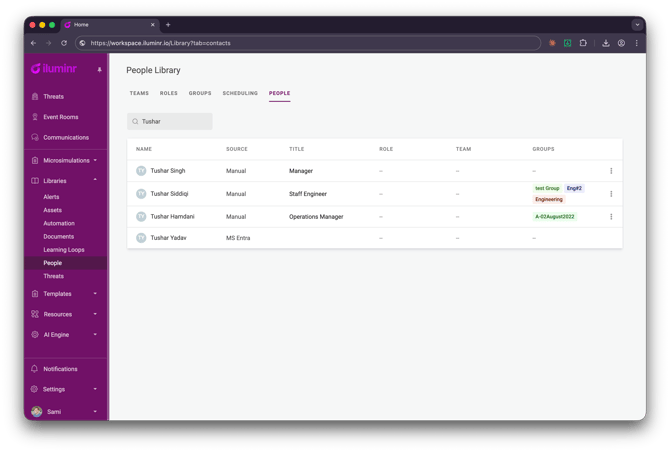
How do I open a person's record?
Click any row to open the person's detail panel on the right. From here you can view and edit their contact details.
How do I delete a user or contact?
- Click the row to open their detail panel.
- Click Delete at the bottom of the panel.
- Confirm the deletion in the pop-up.
Deleting a contact removes them from iluminr permanently. If your account uses Entra Directory Sync, a deleted contact will be re-created on the next sync if they still exist in Entra.
Common tasks
- Build an audience — open the filter panel, narrow by role / department / team / attribute, and save it as a view.
- Invite a wave of people — select the audience (or a saved view) and use bulk actions to invite them at once.
- Bulk-assign attributes or groups — select people and apply in one operation.
- Build the audiences you run often as saved views — reuse them at deployment time.
- Use bulk actions for onboarding waves instead of going person by person.
People tab vs. other People Library views
| I want to… | Go here |
|---|---|
| Find any person by name or email, regardless of which team or group they belong to | People Library → People tab |
| Delete a contact or user | People Library → People tab |
| See contacts grouped by contact group | People Library → Groups |
| Manage user permissions and role sets | People Library → Users |
| Add a new contact manually | People Library → Groups → select group → Add contact |
Frequently Asked Questions
How do I invite a lot of people at once?
Use bulk actions — select your audience (or a saved view) and invite them in one operation.
Can I reuse an audience?
Yes — save it as a view and pick it again whenever you need it.
Where do custom attributes come from?
Set them in iluminr, or sync them from Microsoft Entra so they stay current automatically.
Related Articles
- How to connect Microsoft Entra for Directory Sync
- 5. People Management — Contacts
- 3. People Management — Users
- 4. People Management — Contact Groups
Need more assistance? Submit a support ticket