
Increase your ability to reach more people & reduce barriers to participation by accessing everyday communication and collaboration channels.
- Sending Communications
- Message Types
- Activate Teams
- Broadcast (open reply or closed reply)
- Poll
Connect instantly, simultaneously and meaningfully with your stakeholder base when something goes wrong.
Sending Communications
Video guidance on sending communications in iluminr.
Message Types
Activate Teams
iluminr gives you the power to activate your response teams and understand who is available at the click of a button.

When you send your activation message, each selected team member will receive your message content (this can be sent as both as an email and an SMS ) asking if the recipient is Available/Not Available to assist with the response. This is the message type typically used to stand up a crisis or response team.
Your message will also ask the team members to confirm their availability to respond to the team activation. Learn more at Activate Teams Process.
Broadcast - Open Reply
Communicate with stakeholders with two-way messaging.

The response required option allows for open replies to be received from your message recipients facilitating a broad range of information gathering.

Broadcast - Closed Reply
Disabling the response required option allows for one notification to be issued instructing or advising your stakeholders of an update or directive.

Poll
Create poll messages to collect a greater range of information from your stakeholders at any time, such as their current work location or a location they visited in the past week.

You can use the default YES/NO responses:

OR create up to 5 custom response options:

Escalation (call hunt)
Find the right people for your response by using the Call Hunt team activation capability.
When a team has had an escalation pathway established, you will be able to select a team, confirm all or which roles you would like to activate and issue you a Team Activation that will Hunt through the defined escalation pathway to Activate the appropriate team member. Learn more at: Get to know Call Hunt and How can I send a Call Hunt Team Activation message?
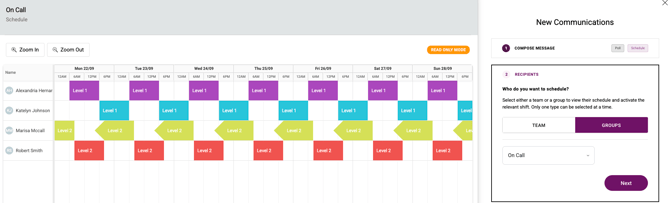
Schedules (roster)
Seamlessly contact your teams via On-call rostering, duty manager rotations, support coverage based on active shifts Learn more at: Get to know Schedules (Rosters).
Contact Recipients
| Teams | These are based on the response teams listed in iluminr (the various user groups who access iluminr in your organisation). |
| Roles | Roles are the roles that are found in the response teams in iluminr (e.g. Team Leader, Communications Coordinator, Team Support etc.). |
| Groups | Groups are customised groups (which can be segmented anyway you and your organisation prefer) of individuals and are managed by your organisation's administrator. |
| Locations | Location groups are automatically managed by iluminr, when a contact has an associated location, iluminr will organise these based on location for your convenience. |
| Contacts | A complete list of all contacts, you have access to. |
Delivery Channels
The current channels of communication available are:
Additional SMS Rates
SMS sent outside of your included usage are billed at the following rates:
| Destination | Per Message Rate (AUD) |
| Australia | $0.07 |
| New Zealand | $0.105 |
| United Kingdom | $0.07 |
| United States of America | $0.07 |
| Other Destinations | $0.07 |
Related Articles:
Need more assistance? Submit a support ticket